• Gallery
  • About
    • Program Mission
    • Faculty
    • Advisory Board
  • Programs
    • AAS in Architecture
    • Summer Intro Courses
  • Courses
    • 110 - Architectural Sketching
    • 121 - Basic Design Studio
    • 122 - Intermediate Design Studio
    • 123 - Advanced Design Studio
    • 166 - Architectural Design 1
    • 170 - Digital Lab 1
    • 171 - Digital Lab 2
    • 172 - Digital Lab 3
    • 202 - Construction 1
    • 204 - Construction 2
    • 220 - Portfolio Development
    • 230 - Structural Fundamentals
    • 266 - Architectural Design 2
  • Class Schedules
    • Fall 2025
    • Spring 2026
  • Digital Access
    • Setting up an Archive Using the Google Drive
    • Downloading the Syllabus from Brightspace
    • Miro: Login, Access & Tools
    • Autodesk Login
    • Rhino Login & Azure Access
    • Creative Suite Access
  • After CCC
    • Transfer - Architecture
    • Transfer - Interior Architecture
    • Architecture Degrees from Outside U.S.
    • Career Paths
  • Resources
    • Advising
    • Good Reads
    • Recommended Films & Videos
  • Extra-Curricular
    • Events
    • CCC Urban Sketchers
  • Contact Us

CCC Architecture

Programs in Architectural Studies at the City Colleges of Chicago

  • Gallery
  • About
    • Program Mission
    • Faculty
    • Advisory Board
  • Programs
    • AAS in Architecture
    • Summer Intro Courses
  • Courses
    • 110 - Architectural Sketching
    • 121 - Basic Design Studio
    • 122 - Intermediate Design Studio
    • 123 - Advanced Design Studio
    • 166 - Architectural Design 1
    • 170 - Digital Lab 1
    • 171 - Digital Lab 2
    • 172 - Digital Lab 3
    • 202 - Construction 1
    • 204 - Construction 2
    • 220 - Portfolio Development
    • 230 - Structural Fundamentals
    • 266 - Architectural Design 2
  • Class Schedules
    • Fall 2025
    • Spring 2026
  • Digital Access
    • Setting up an Archive Using the Google Drive
    • Downloading the Syllabus from Brightspace
    • Miro: Login, Access & Tools
    • Autodesk Login
    • Rhino Login & Azure Access
    • Creative Suite Access
  • After CCC
    • Transfer - Architecture
    • Transfer - Interior Architecture
    • Architecture Degrees from Outside U.S.
    • Career Paths
  • Resources
    • Advising
    • Good Reads
    • Recommended Films & Videos
  • Extra-Curricular
    • Events
    • CCC Urban Sketchers
  • Contact Us

Downloading the Syllabus from Brightspace

As you take courses it is important that you retain digital copies of all your syllabi. Why? You may be asked for them if you transfer. It can be a challenge to obtain them once the semester has passed.

Login to the Brightspace course site. First, go to ccc.edu and select Brightspace from the Student Tools menu.  Login using your ccc username and password. If you don't have one yet, you will need to set one up.  Ask for assistance if you need it.


Next you will be downloading the syllabus and uploading it to your folder Google folder for the course. Navigate to the syllabus on the Brightspace course site by clicking on it in the menu.

Read the syllabus. At the bottom you can acknowledge that you have read it.

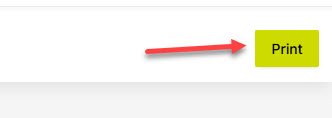
In the upper right corner, click on Print to print the syllabus.
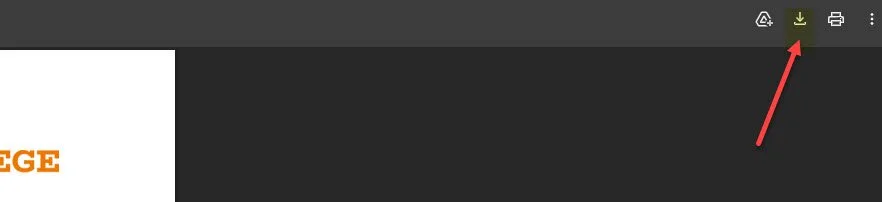
A print preview will appear. In the upper right click on the Download icon.


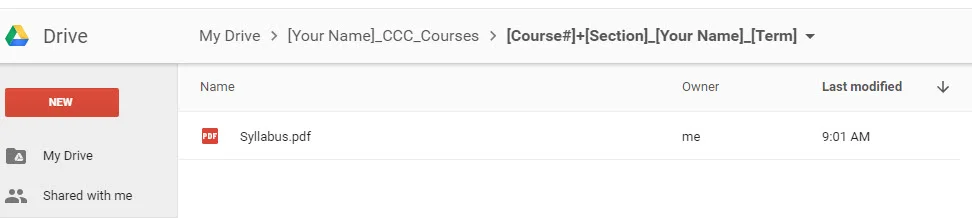
Next you will be uploading the syllabus to your Google Drive folder for the course. Go to the Google Drive. Double-click on the course folder to enter the folder. When you are inside a folder you will see it along the top of your screen.

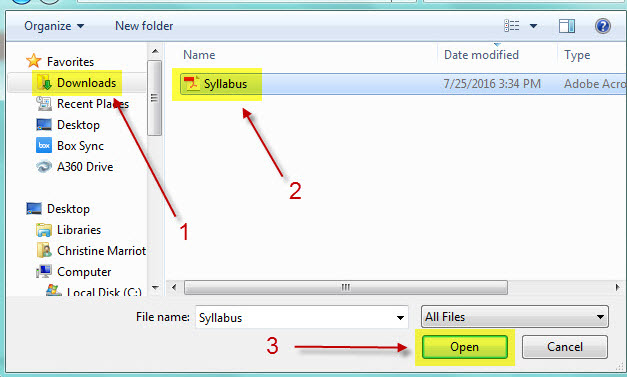
Upload the syllabus by clicking on New and selecting File upload. 

You will probably find the syllabus in your Download folder unless you directed it to another location. 
Once uploaded, the file should be visible within the folder. Please note that this is how you will submit assignments for this course.